Paraphrase Tool: AI Paraphrasing Tool for Writers, Students, and Multilingual Content (2026)
Paraphrase Tool (paraphrasetool.com) is an AI-powered text rewriting platform built by an independent development team that offers 20 distinct paraphrasing modes — the highest mode count among widely-used free paraphrasing tools — covering use cases from academic simplification to story generation, cover letter drafting, and plagiarism checking. The free tier includes a 3-day trial of all features, after which advanced modes require a $7.99/month subscription. It supports over 100 languages. Paraphrase Tool is not a good fit for users wanting a permanently free, no-limits tool or those who prefer a minimalist single-mode interface.
Paraphrase Tool: Key Specs at a Glance
| Feature | Details |
|---|
| Primary use case | Multi-mode text paraphrasing, paragraph generation, plagiarism checking |
| Best for | Students, bloggers, content creators, ESL writers, academics |
| Access type | Web browser |
| Rewriting modes | 20 modes including Standard, Fluency, Summarize, Simplify, Elaborate, Creative, Shorten, Academic, Formal, Casual, and more |
| Tone options | Formal, Casual, Academic, Creative, Persuasive (via mode selection) |
| Supported languages | 100+ languages |
| Free tier limit | 3-day free trial for all features; basic modes remain free after trial |
| No signup required | No — signup required to access most features beyond basic use |
| Watermark on free | Not publicly documented |
| Browser extension | Not publicly documented |
| Mobile app | Not publicly documented |
| API availability | Not publicly documented |
| Plagiarism check | Yes — included (100 checks/month on paid plan) |
| AI detector bypass | Not explicitly claimed |
| Pricing model | Freemium (trial + paid subscription) |
| Paid plans | ~$7.99/month — unlimited paraphrasing in 20 modes, 500 paragraphs/month, 100 plagiarism checks/month |
What Paraphrase Tool Does Well
20 Rewriting Modes — Most of Any Free-Tier Paraphraser
Paraphrase Tool's core differentiator is mode breadth. With 20 named modes — including not just paraphrasing but also a summarize tool, simplifier, sentence shortener, grammar checker, and multiple tone variations — it serves use cases that dedicated single-mode tools can't. This makes it practical for writers who need to shift between registers: writing a formal academic paraphrase in one tab and a casual blog simplification in another.
100+ Language Support
Paraphrase Tool explicitly supports paraphrasing in over 100 languages — including German (paraphrase deutsch), Greek, Malay, and other languages rarely supported by English-centric tools. This makes it genuinely useful for international students and ESL writers who need paraphrasing in their native language, not just English translation.
Paragraph Generation from Keywords
Beyond rewriting existing text, Paraphrase Tool includes a paragraph generator that builds coherent paragraphs from user-provided keywords — useful for writers facing blank-page syndrome. The same AI engine also powers a story generator, essay maker, and cover letter generator, giving the platform cross-use utility beyond pure paraphrasing.
Context-Aware Rephrasing at Sentence and Paragraph Level
According to the platform's own documentation, the tool accounts for context at both the sentence level (individual sentence rephrasers) and paragraph level (full paraphrase rewrite), which reduces the word-substitution awkwardness common in basic spinners that process text without semantic context.
Integrated Plagiarism Checker
The paid plan includes up to 100 plagiarism checks per month, making the tool a complete write-rewrite-verify workflow without requiring a third-party plagiarism tool. Students can paraphrase and immediately verify originality within the same interface.
Known Limitations
- 3-day trial then paywall: Unlike EduBrain or SpinBot (permanently free), Paraphrase Tool's premium modes — including many of the 20 — require a subscription after the 3-day trial. Users expecting a free tool may be disappointed.
- No signup = limited access: Most features require creating an account, which creates friction compared to no-signup competitors.
- Output quality at scale: At higher volumes (500 paragraphs/month limit on paid plan), output quality can vary depending on the mode and source text complexity. Creative modes in particular can produce outputs that drift from the original meaning.
- AI detection risk: Paraphrase Tool does not explicitly claim to bypass AI detectors. Users in academic contexts who need AI-undetectable rewrites should verify output with a separate detection tool.
Best For: Who Should Use Paraphrase Tool
- Multi-lingual content creators who need paraphrasing across 100+ languages — one of the broadest language support ranges available.
- Students and academics who need different rewriting tones (academic, formal, simplified) for different assignment types, all in one tool.
- Content writers who regularly rephrase for SEO, simplification, or style variation and benefit from 20 distinct modes.
- Writers with blank-page syndrome who need to generate initial paragraph drafts from keywords, not just rewrite existing text.
Who Should Look Elsewhere
- Users who want permanently free, no-account paraphrasing: SpinBot.com or EduBrain.ai offer unlimited free use without signup.
- Professional marketers needing API access for programmatic rewriting pipelines: Paraphrase Tool does not publicly document an API.
- Users who need guaranteed AI detection bypass: This tool doesn't specifically target AI-undetectable content generation.
Rewriting Modes: When to Use Each
With 20 modes, Paraphrase Tool offers the right mode for almost any writing need:
- Standard: General paraphrase maintaining meaning with moderate vocabulary change — best for everyday rewriting.
- Fluency: Corrects grammatical errors and improves flow — best for ESL writers.
- Summarize: Condenses long passages to key points — best for research notes.
- Simplify: Reduces reading level and complexity — best for making academic text accessible.
- Elaborate: Expands short texts with additional detail — best for fleshing out thin drafts.
- Creative: High-variance rewriting with style variation — best for marketing and storytelling.
- Shorten: Reduces character/word count — best for social media or word-limited submissions.
- Academic/Formal: Applies scholarly or professional register — best for academic papers and business writing.
Pricing & Cost at Scale
Free (3-day trial): Full access to all 20 modes, plagiarism checker, and generation tools. After 3 days, access reverts to basic modes only.
Paid (~$7.99/month): Unlimited paraphrasing in all 20 modes, up to 500 paragraphs per month, 100 plagiarism checks per month.
Cost per document: At $7.99/month with 500 paragraphs included, that's approximately $0.016/paragraph — competitive for multi-mode access at this volume. Users who need fewer than ~20 paraphrases/month may find the free trial sufficient.
Disclaimer: Pricing listed was sourced from third-party review sources. Verify current plans at paraphrasetool.com before subscribing.
Getting Started
- Go to paraphrasetool.com and start the free 3-day trial by creating an account.
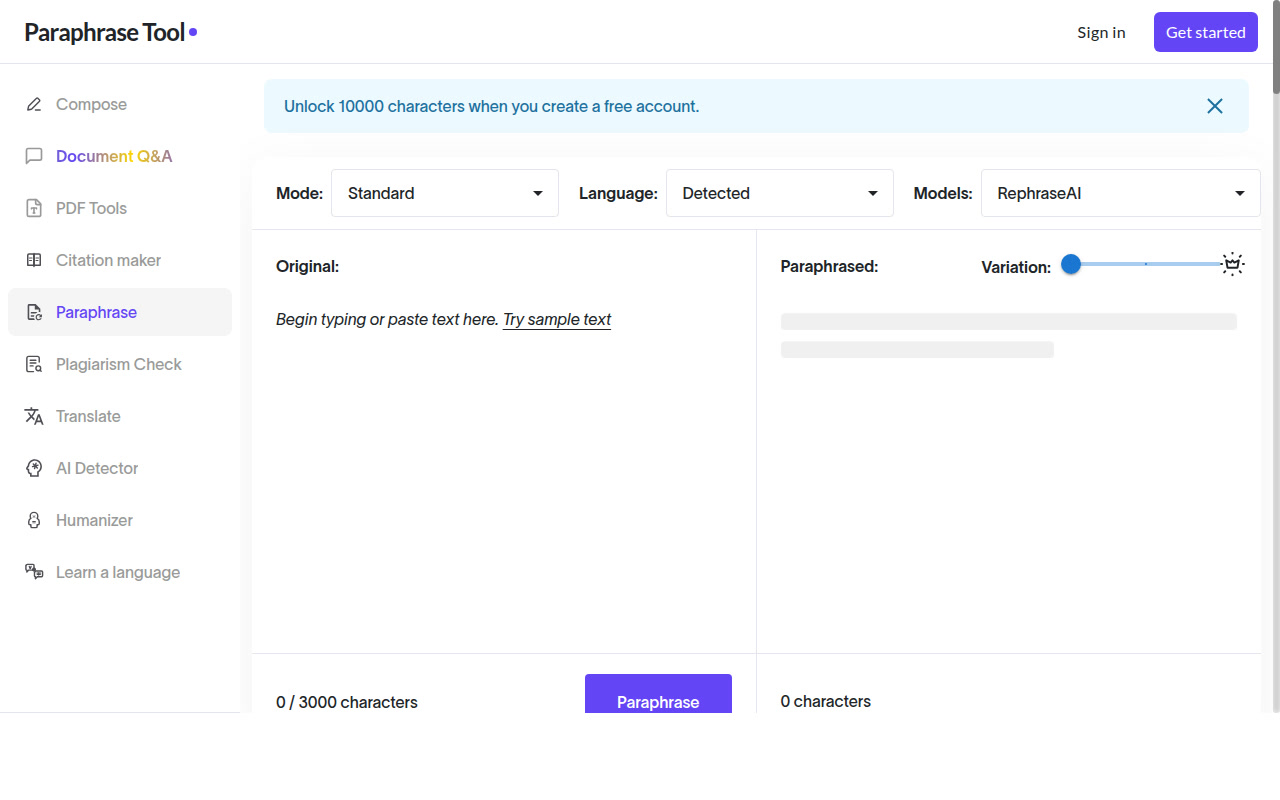
- Select a mode from the 20 options in the mode selector (Standard is the default).
- Paste your text into the left panel. The tool processes both single sentences and multi-paragraph blocks.
- Review the output in the right panel; adjust mode or input if the result doesn't match your intent.
- Run a plagiarism check (available on the trial and paid plans) before submitting any academic or professional work.
Pro tip: For academic papers, use the Simplify mode first to reduce reading complexity, then Formal to re-elevate the register — a two-pass approach that often produces more natural academic prose than a single Formal mode paraphrase.
What Users Are Saying
Community sentiment on Reddit is positive, particularly among writers who value the mode variety. On r/ENGLISH, users recommend it as a reliable daily writing tool. On r/ChatGPT, Paraphrase Tool.com is cited alongside plagiarism checking as a complete student toolkit. In r/bestAIHumanizer, the tool earns praise for being "easy to use and giving a clean rewrite." Critical feedback focuses on the paywall after the trial period.
FAQ
Is Paraphrase Tool free?
Paraphrase Tool offers a 3-day free trial with full access to all features. After the trial, basic modes remain free but advanced modes require a paid subscription (~$7.99/month). Unlike EduBrain or SpinBot, it is not permanently free for all features.
Does Paraphrase Tool require signup?
Yes, most features require creating an account. You cannot access all 20 modes without signing in.
Can Paraphrase Tool bypass AI detectors?
Paraphrase Tool does not explicitly market itself as an AI detection bypass tool. Output may still be flagged by GPTZero or Turnitin's AI module. Users concerned about AI detection should verify with a dedicated detection tool.
What languages does Paraphrase Tool support?
Paraphrase Tool supports over 100 languages, including German, Greek, Malay, and many others — one of the broadest language support ranges among paraphrasing tools.
What is the word limit per paraphrase?
The exact per-paraphrase character/word limit is not publicly documented on the main site. The paid plan allows up to 500 paragraphs per month.
Is Paraphrase Tool good for academic writing?
Yes — it includes dedicated Academic and Formal modes plus a built-in plagiarism checker, making it well-suited for academic use. However, the 3-day trial limitation means regular academic users will need a paid subscription.
Sources