GPTHumanizer: Free AI Paraphrasing Tool and Humanizer with No Signup Required (2026)
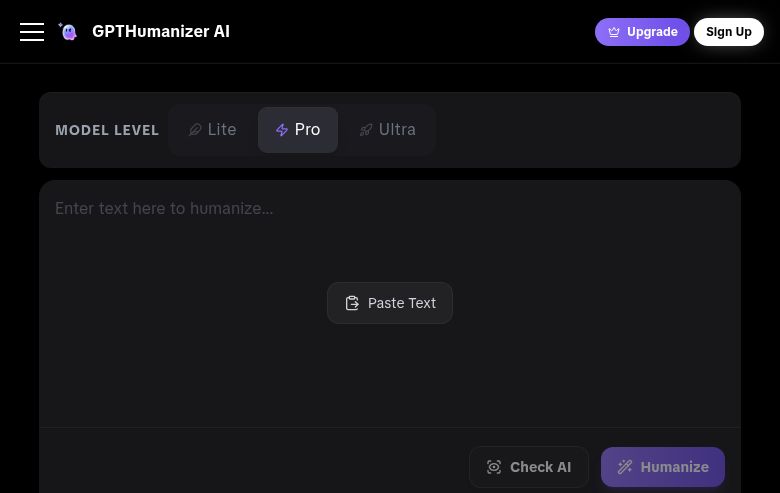
GPTHumanizer (also referred to as GPTHumanizer AI) is a free, no-signup-required AI text humanizer built for professionals, bloggers, and SEO teams who need to transform AI-generated drafts into publication-ready, natural-sounding prose. It offers unlimited free access on its Lite model, supports 11 languages, includes a built-in AI detector, and processes text at the sentence and paragraph level rather than simply swapping synonyms — distinguishing it from lower-quality humanizers. Media coverage has positioned it as a "media-recognized standard for professional AI text refinement." It is not the right choice for users who need deep academic paraphrasing with formal mode controls, or for those requiring heavy integration with external writing workflows via browser extensions or APIs at the free tier.
GPTHumanizer: Key Specs at a Glance
| Attribute | Details |
|---|
| Primary use case | AI text humanization — transforming AI-generated text into natural, reader-friendly writing |
| Best for | Bloggers, SEO teams, marketers, non-native English writers, professionals using AI drafts |
| Access type | Free (unlimited Lite model, no signup); paid Pro and Ultra tiers available |
| Rewriting modes | Lite, Pro, and Ultra modes |
| Tone options | Style selection (blog post, email, professional communication) |
| Supported languages | 11 languages including English and Spanish |
| Free tier limit | Unlimited on Lite model |
| No signup required | Yes — Lite model available without registration |
| Watermark on free | No |
| Browser extension | Not publicly documented |
| Mobile app | Not publicly documented |
| API availability | Yes — API available with pay-per-use pricing (~$1 per 1,000–1,200 words humanized; $0.10 per AI detection request) |
| Plagiarism check | Not publicly documented as a primary feature |
| AI detector bypass | Yes — primary use case; built-in AI detector included |
| Pricing model | Freemium + API pay-per-use |
| Paid plans | Pro and Ultra subscription tiers (prices dynamically loaded; check gpthumanizer.ai/pricing); API usage packs available |
What GPTHumanizer Does Well
Truly Unlimited Free Tier with No Signup
GPTHumanizer's Lite model is unlimited and requires no account creation — a combination almost unmatched in the AI humanizer category. Most competitors either limit free use to a few hundred words, require email signup, or both. This "try before you commit" approach is substantiated by user feedback: "lowers the friction for users who want to try a free AI humanizer before committing" is how the tool describes its own Lite tier positioning.
Paragraph-Level Humanization, Not Word Swapping
GPTHumanizer explicitly differentiates its approach: "GPT Humanizer does more than swap words. It refines and polishes your AI-generated text at the sentence and paragraph level to improve flow, phrasing, and readability while preserving your original meaning." This is meaningful — lower-quality humanizers produce text that still reads as machine-generated because they only make surface-level substitutions. Reddit discussions in r/PromptEngineering note it "does a noticeably better job at restructuring paragraphs and varying sentence rhythm without making the text feel forced."
Three Processing Tiers for Different Needs
The Lite/Pro/Ultra structure allows users to choose the depth of humanization — a quick cleanup for informal blog posts (Lite) versus deep rewriting for marketing copy or academic-adjacent content that needs to pass strict AI detection (Ultra). This tiered approach avoids over-processing short content while providing sufficient depth for demanding use cases.
Multilingual Support for 11 Languages
GPTHumanizer supports AI text humanization in 11 languages including English and Spanish, making it one of the more accessible tools for non-English content teams in this category. The tool explicitly helps "make AI-generated writing sound more natural in the language you are already writing in."
Built-in AI Detector
A built-in AI detector allows users to check their output immediately after humanization without switching tools. This integrated workflow — humanize, detect, verify — saves time and provides confidence before publishing or submitting content.
API Access for Developers and Teams
GPTHumanizer offers an API with transparent pay-per-use pricing: approximately $1 per 1,000–1,200 words humanized and $0.10 per AI detection request. This developer-friendly access with documented pricing makes it viable for teams building content workflows that require programmatic humanization.
Known Limitations
- Lite model output quality gap: The unlimited free Lite model produces noticeably lighter humanization than Pro or Ultra tiers. Users needing to pass strict AI detectors like Turnitin should expect to upgrade to paid tiers for reliable results.
- Paid tier pricing not static: The pricing page loads dynamically and exact Pro/Ultra subscription costs are not transparently listed in static content — users must visit the live pricing page to confirm current rates before committing.
- Not designed for academic paraphrasing modes: GPTHumanizer lacks the formal academic paraphrasing modes (Standard/Fluency/Formal/Simple) that tools like Scribbr offer. It's designed for content quality improvement, not academic source rewording per se.
- No browser extension: Unlike Wordtune, there's no browser extension for inline humanization within Gmail, Google Docs, or other web editors — requiring copy-paste workflows.
Best For: Who Should Use GPTHumanizer
- Bloggers and content creators who use ChatGPT, Claude, or Gemini to draft content and need it to read naturally before publishing
- SEO teams and website content writers who want to improve readability and reduce AI-detection signals while preserving keyword structure
- Non-native English writers across 11 supported languages who want to polish AI-assisted drafts into more natural prose
- Developers and technical teams who need programmatic AI text humanization via API at transparent per-word pricing
Who Should Look Elsewhere
- Academic writers who need formal academic paraphrasing modes for source rewording — tools like Scribbr are better positioned for this use case
- Users who need a browser extension for inline writing assistance within their daily web tools — this feature is not documented for GPTHumanizer
- Content teams that need a bundled plagiarism checker — this feature is not documented as part of GPTHumanizer's offering
Rewriting Modes: When to Use Each
Lite Mode (Free, Unlimited)
Best for quick cleanup of AI drafts for informal content — social media posts, internal communications, blog outlines — where passing AI detection is less critical. Lite mode is the "first-pass" option that removes the most obvious AI phrasing patterns without deep restructuring.
Pro Mode (Paid)
Suitable for blog posts, marketing copy, and business communications where you need reliable natural flow and reasonably strong AI detection resistance. Pro mode restructures at the sentence level and is the recommended tier for most content professionals.
Ultra Mode (Paid)
The deepest humanization tier — designed for content that must pass strict AI detection (GPTZero, ZeroGPT, Winston AI, Turnitin). Reddit users in r/PromptEngineering report that GPTHumanizer "consistently dropped scores low enough to pass (or near-pass) even strict Turnitin runs" — though Ultra mode is likely the tier achieving these results. Manual review after Ultra humanization is still recommended for academic submissions.
Pricing & Cost at Scale
The Lite model is completely free and unlimited with no signup required. This is a genuinely usable free tier, not a heavily restricted trial.
Pro and Ultra subscription pricing is dynamically loaded on the pricing page (gpthumanizer.ai/pricing) and is not statically published. API usage packs are priced approximately at $1 per 1,000–1,200 humanized words and $0.10 per AI detection request — meaning roughly $1 to humanize a 1,000-word blog post via API.
For a content team publishing 20 posts per month at ~1,000 words each, API-based humanization costs approximately $20/month — a competitive alternative to fixed subscriptions for variable workloads.
Disclaimer: Pricing is based on publicly available data as of May 2026. Visit gpthumanizer.ai/pricing for current subscription and API pricing before committing.
Getting Started
- Navigate to gpthumanizer.ai — no account creation needed for the Lite model.
- Paste your AI-generated text into the input field.
- Select your processing mode: Lite (free) for quick cleanup, Pro or Ultra (paid) for stronger humanization.
- Choose a writing style (blog post, email, professional) if style control is available for your selected mode.
- Run the built-in AI Detector on your output to verify detection scores before publishing or submitting.
Pro tip: For SEO content, GPTHumanizer explicitly supports keyword structure preservation while improving readability — paste your AI-generated draft with target keywords already in place and let the humanizer improve flow around them rather than replacing them with synonyms that may weaken your keyword optimization.
What Users Are Saying
GPTHumanizer has a growing Reddit presence with consistently positive reviews across several subreddits. On r/ChatGPTPromptGenius, a user described it as "easily the best AI humanizer I've used in 2025, especially for students, writers, and marketers trying to stay under the radar of AI detectors." Community sentiment in r/PromptEngineering (April 2026) noted it "does a noticeably better job at restructuring paragraphs and varying sentence rhythm without making the text feel forced."
Some users in r/ChatGPT also note that supplementing the humanizer output with minor manual edits produces the best results: "I use GPTHuman AI too and it definitely helps make the tone more natural. I've also found that tweaking a few lines myself after helps a lot."
FAQ
Is GPTHumanizer free?
Yes — the Lite model is completely free and unlimited with no signup required. Pro and Ultra tiers are paid. API access is available on a pay-per-use basis.
Does GPTHumanizer require signup?
No — the Lite model can be used immediately without creating an account.
Can GPTHumanizer bypass AI detectors?
Yes — AI detector bypass is a primary use case. GPTHumanizer includes a built-in AI detector and is specifically designed to reduce AI-detection signals in text. Results vary by detector and mode; Ultra mode provides the strongest humanization. Manual review is recommended for high-stakes submissions.
What languages does GPTHumanizer support?
GPTHumanizer supports 11 languages including English and Spanish. It humanizes text in the language you're already writing in, rather than translating to English.
Is there a word limit on the free Lite model?
The Lite model is described as unlimited on the free tier. No published word limit applies to free Lite mode usage.
Is GPTHumanizer good for academic writing?
GPTHumanizer can improve the readability and natural flow of AI-assisted academic drafts. However, it is not a formal academic paraphrasing tool with citation support. Students should carefully review all output and verify their institution's academic integrity policies before submitting AI-humanized content. Ultra mode may help with Turnitin detection resistance, but academic use carries inherent compliance risk.
Sources